
Google Ads Leads for B2B Teams: Capture and Qualify

The fastest way to start generating and qualifying leads with Google Ads is to create a campaign with a "Leads" objective, add a Lead Form Asset, and connect it to an automated delivery flow via webhook or CRM. Without that connection, forms accumulate contacts that expire after 60 days and never reach the sales team. With it, Google's AI receives fresh signals and begins optimizing for prospects with the highest probability of closing.
Here are four actions that make a difference from day one:
- In 1 minute: Create the campaign with a "Leads" objective and add a Lead Form Asset in Search or Performance Max.
- In 1 hour: Set up automatic delivery via webhook or integration with HubSpot, Salesforce, or Zapier, and activate Google Tag along with Enhanced Conversions.
- In 1 day: Define what a qualified lead is for your business, add qualifying questions to the form, activate OTP verification for phones, and map the complete flow from form submission to sale closure.
- Indicators to watch from the start: Lead volume, qualification rate, cost per lead (CPL), and lead-to-sale conversion rate.
Table of Contents
- How does Google Ads generate leads and what formats exist?
- What requirements must you meet before launching your campaigns?
- How to set up a lead-oriented campaign step-by-step
- How to design forms that convert and filter at the same time?
- Measurement and attribution: how to feed AI with data that matters
- What lead delivery method is best depending on your technical maturity?
- How to qualify leads and optimize campaigns for real quality
- Advanced tactics to improve quality without losing scale
- Key metrics to evaluate the quality of your leads and calculate ROI
- Case study: how Gmarketingc improves lead capture and qualification
- Key points
- What is most underestimated in lead generation with Google Ads
- Gmarketingc manages your lead campaigns from start to finish
- Resources and documentation to continue learning
- Frequently Asked Questions
How Google Ads Generates Leads and What Formats Are Available
A lead in Google Ads is a contact who interacts with an ad and provides their data, such as name, email, or phone number, either through a native form or a direct action like a call. Google stores these records for a limited period, which makes automated delivery not optional but necessary.
There are four formats that generate leads. Lead Form Assets are native forms that open within the ad itself, without redirecting the user to another page; they work in Search, Performance Max, YouTube, and Display. Call extensions turn a phone call into a trackable conversion event. Landing pages with conversions marked using Google Tag remain the most flexible format for campaigns with complex messages or more elaborate qualification processes. And Performance Max and Demand Gen combine all Google channels into a single AI-powered campaign, distributing creative resources where the probability of conversion is highest.
Google documents that its products reach over 2 billion monthly users, and that scale is precisely what makes the intent signal so valuable: the algorithm interprets searches, YouTube interactions, Display behavior, and multichannel signals to predict which users are most likely to complete a form. According to official documentation, users go through several touchpoints before submitting a form, reinforcing the need to be present in multiple formats.
The typical lead flow follows this path: ad impression, click or native form opening, data submission, delivery to CRM via CSV, API, webhook, or Zapier, and finally commercial validation. Each link in that chain can break if not properly instrumented. Lead Form Assets have specific eligibility requirements, and accounts must comply with Google's privacy policies to activate them.
What Requirements Must You Meet Before Launching Your Campaigns?
Before publishing any lead-oriented campaign, there are three areas to review: legal compliance, technical eligibility, and bidding setup. Skipping this step generates blockers that can delay launch by weeks.
- Privacy Policy: The Lead Form Asset requires a public link to your company's privacy policy. Without that link, the form cannot be published. For companies operating in Spain and the European Union, this policy must comply with GDPR: specifying how personal data is processed, the retention period, and mechanisms for transferring data to third parties like HubSpot or Salesforce.
- Eligibility by vertical: Some sectors, such as financial services, healthcare, or adult content, have additional restrictions. Official documentation on Lead Form Assets details which categories are excluded and which require additional verification.
- Advertiser Verification: Accounts with high spending volume or in sensitive sectors may be required to complete the Advertiser Verification process before accessing certain formats.
- Bidding Strategy: Lead Form Assets are only eligible when the campaign uses a conversion-oriented strategy. "Maximize clicks" does not activate native forms; you need "Maximize conversions," "Target CPA," or "Maximize conversion value."
Pro tip: Before launching, review the consent flow in your form. In Spain, consent to receive commercial communications must be explicit and separate from consent for data processing. A form that mixes both can lead to legal issues and reduce the submission rate.
How to Set Up a Lead-Oriented Campaign Step-by-Step
Setting up an effective campaign is not just about choosing the right objective: it's a sequence of decisions that determine what signals the AI receives and how quickly it learns.
-
Choose the "Leads" objective when creating the campaign. Google will ask you to select the campaign type: Search for direct search intent, or Performance Max for multichannel reach with AI. For B2B teams with moderate initial budgets, Search with Lead Form Assets offers more control over keywords and messaging.
-
Add the Lead Form Asset. The mandatory elements are: form headline (max 30 characters), description (max 200 characters), contact fields (name, email, phone as needed), link to the privacy policy, and confirmation URL. The headline copy should be specific: "Request your free audit" converts better than "Contact us." Consult the complete form creation requirements in the official documentation.
-
Define the initial bidding strategy. If you prioritize volume to accumulate data quickly, use "Maximize conversions" without a target CPA for the first few weeks. Once you have at least 15 conversions in 30 days, you can activate "Target CPA" or "Maximize conversion value" with value rules assigned by lead category.
-
Configure audience signals. In Performance Max, add Customer Match segments with your existing database, remarketing lists, and custom intent audiences. In Search, apply bid adjustments by audience and exclude low-intent segments like visitors who bounced in less than 5 seconds.
-
Establish exclusions and inventory controls. Exclude negative keywords from day one (competitors, informational terms without purchase intent, irrelevant variations) and define content restrictions to protect the brand.
Pro tip: The most common mistake when starting is to use the generic form submission as the conversion objective. Create a specific conversion action called "Qualified lead" and use it as the main objective. This way, you teach the algorithm from the beginning what type of submission has real value.
How to design forms that convert and filter simultaneously?
The design of the Lead Form Asset resolves a real tension: the more fields you add, the more you filter, but also the more you reduce the submission rate. The key is to use Google's advanced features to filter without friction.
-
Minimum fields to maximize submissions: full name plus email or phone. Each additional field reduces the conversion rate. If you need more data, collect it in the subsequent qualification step, not in the initial form.
-
Qualifying questions: Lead Form Assets allow you to add multiple-choice questions that automatically tag responses as "valuable" according to your defined criteria. For B2B, the most effective questions are: company size (less than 10, 10–50, more than 50 employees), estimated available budget, and decision timeframe (this month, in 3 months, exploring). A response indicating "more than 50 employees" and "budget available this month" can be automatically marked as a qualified lead.
-
OTP verification: When available, one-time password (OTP) verification for phone numbers filters out invalid numbers before they reach the CRM. This significantly reduces unproductive work for the sales team.
-
Conditional answers: Google allows showing additional questions only if the user answers in a certain way. This keeps the form short for most and adds depth only for prospects who have already shown intent.
Pro tip: Test two versions of the form in parallel: one with only name and email, and another with a multiple-choice qualifying question. Measure not only the submission rate but also the percentage of leads that the sales team considers valid. In most B2B cases, the form with a qualifying question generates less volume but a notably higher closing percentage.
Measurement and attribution: how to feed AI with data that matters
Google's AI, whether Smart Bidding or Performance Max, optimizes towards what you tell it has value. If you only tell it "form submission," it will optimize to get submissions, including low-quality ones. Correct instrumentation changes that equation.
-
Google Tag: Install the Google tag on all site pages and confirm that relevant conversion events are being recorded correctly. Without this foundation, no other layer of measurement works well.
-
Enhanced Conversions: This feature sends first-party data, such as the lead's email, in an encrypted form to Google to improve attribution in cookie-restricted environments. Google's best practices indicate that enhanced conversions improve measurement accuracy and, therefore, the quality of signals received by the algorithm.
-
Offline conversion import: When a lead becomes a customer days or weeks after the click, that data must be sent back to Google Ads via offline conversion import. The key identifier is the GCLID (Google Click ID), which is captured at the time of the click and allows closing the lead-to-sale loop. This is the most valuable signal you can give to the AI.
-
Value assignment: Define an estimated monetary value for each lead category. A lead that answers "budget available this month" might be worth three times more than one that answers "exploring options." This difference, translated into conversion values, activates value-based bidding (Maximize conversion value / Target ROAS).
-
Update frequency: Offline data import should be daily at a minimum. A real-time webhook is the ideal option because it keeps data fresh and allows the algorithm to adjust bids with current information, not data from a week ago.
What lead delivery method is best depending on your technical maturity?
The choice of delivery method determines how long it takes for a lead to reach the sales team and how fresh the data received by the AI is. Here's a practical comparison:
| Method | Latency | Technical complexity | Risk of loss | Ideal for |
|---|---|---|---|---|
| CSV (manual download) | High (hours or days) | Low | High (60-day window) | Initial tests or very low volumes |
| Google Ads API | Low | High | Low | Companies with their own technical team |
| Webhook | Very low (real-time) | Medium | Very low | Any company with a configured CRM |
| Zapier / integrators | Low (minutes) | Low | Low | SMBs without development resources |
CSV download is simple but manual: leads accumulate in Google Ads and must be downloaded before the retention window expires. Google retains leads for a limited period, which makes manual downloading a process with a real risk of data loss if not automated.
The Google Ads API offers complete automation for high volumes, but requires a developer token and continuous technical maintenance. The webhook is the most balanced solution: it delivers leads in real-time directly to the CRM (HubSpot, Salesforce, or others) without the need for complex code, and it's the option that best feeds the AI with fresh data. Zapier acts as a no-code intermediary between Google Ads and the CRM, with a latency of minutes and an implementation that does not require development.
The operational recommendation is clear: prioritize a webhook if you have a configured CRM, use Zapier if you lack technical resources, and reserve the API for when volume justifies the development investment. The goal is for no lead to take more than an hour to reach the sales team.
How to qualify leads and optimize campaigns for real quality
Optimizing for volume without qualifying is the most expensive mistake in lead generation with Google Ads. A basic lead scoring model, even if manual at first, completely changes the direction of optimization.
-
Define the attributes of a qualified lead. For B2B, common criteria are: company size, contact's job title, available budget, decision timeframe, and industry. Assign points to each attribute according to its historical correlation with sales closures.
-
Translate scores into monetary values. A high-scoring lead might be worth €500; a low-scoring one, €50. This difference, uploaded as a conversion value in Google Ads, activates value-based bidding. Official documentation recommends using Maximize conversion value or Target ROAS instead of optimizing only for volume when sufficient value data is available.
-
Create differentiated conversion actions. Set up at least two: "Lead received" (form submission) and "Qualified lead" (validated by the sales team). Use "Qualified lead" as the main Smart Bidding objective. If you have closing data, add "Converted lead" as a third action.
-
Criteria for changing tactics. Start with "Maximize conversions" without a CPA restriction until you accumulate 15 conversions in 30 days. Then activate "Target CPA" with a conservative initial value. When you have assigned values and at least 50 monthly conversions, migrate to "Maximize conversion value."
-
Validation checklist before scaling budget: confirm that the GCLID is captured on all forms, that offline import is working correctly, that conversion values reflect the actual scoring, and that the latency between submission and upload to Google Ads is less than 24 hours.
Advanced tactics to improve quality without losing scale
Achieving a high volume of consistent quality leads requires combining segmentation, creativity, and inventory controls. None of these levers work alone.
-
Customer Match and similar segments: Upload your current customer database to Google Ads and use it as an audience signal in Performance Max. The algorithm identifies patterns in those contacts and searches for users with similar characteristics. Explicitly exclude low-intent audiences: visitors who only read the blog, users who bounced in less than 10 seconds, or demographic segments that historically do not convert.
-
Creativity by funnel stage: In Performance Max, high-performing assets (images, headlines, videos) automatically receive more budget. Create differentiated asset groups: one for users in the consideration phase (educational messages, use cases) and another for users with purchase intent (direct value proposition, specific CTA). Performance Max best practices emphasize that the variety and quality of creative assets is one of the most determining factors in the quality of generated leads.
-
Inventory controls: In Display and YouTube campaigns, exclude sensitive content categories, low-quality mobile apps, and placements that historically generate clicks without conversion. These controls protect both the brand and the budget.
-
Broad match with Smart Bidding: Broad match, combined with Smart Bidding, allows capturing relevant searches that exact or phrase matches do not cover. The condition is to monitor search terms weekly and add negatives with agility.
Pro tip: Use YouTube to generate consideration and then re-capture that audience with Lead Form Assets in Performance Max. A user who watched your video until the end has a much clearer intent than someone who first arrived from a generic search. This quality signal, combined with a native form, usually produces leads with higher qualification rates.
Key metrics to evaluate lead quality and calculate ROI
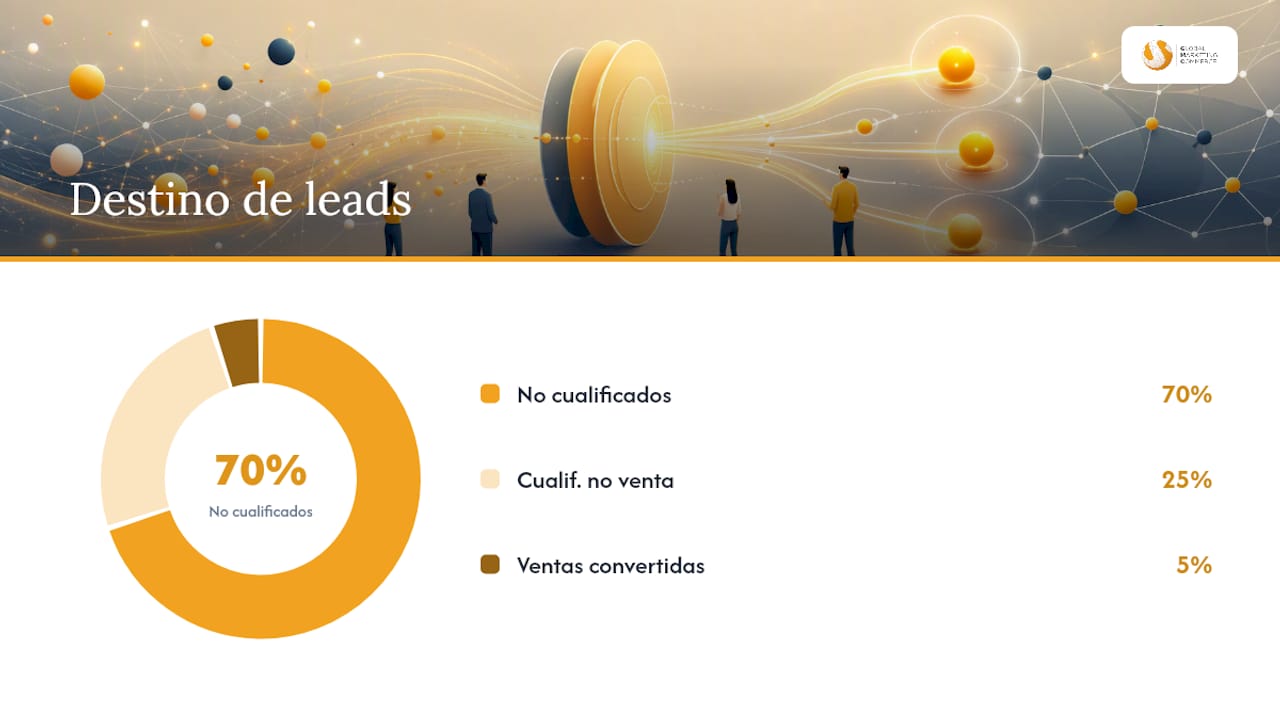
CPL (cost per lead) is the most visible indicator, but also the most misleading if viewed alone. A low CPL with a 5% qualification rate is more expensive than a high CPL with a 40% rate.
Definitions you need to be clear about:
- CPL: total investment divided by the number of leads received.
- Cost per qualified lead: total investment divided by the leads that passed the qualification process.
- Lead-to-sale: percentage of leads that convert into customers.
- LTV by cohort: customer lifetime value segmented by source or origin campaign.
Practical calculation example: You invest €2,000 and receive 100 leads. The CPL is €20. Of those 100, the sales team validates 30 as qualified: the cost per qualified lead rises to €66.67. Of those 30, you close 5 sales with an average value of €1,500 each. The generated revenue is €7,500, with an ROI of 275% on the initial investment. That calculation, and not the isolated CPL, is what should guide budget decisions.
The cost per lead varies widely depending on the industry and competition, because Google Ads operates through auction. There is no fixed rate per lead: CPL depends on the bid, ad quality, sector competition, and campaign settings.
Campaign health indicators you should review weekly:
- Percentage of leads with valid data (no fake emails or incorrect phone numbers).
- Rejection rate due to invalid data, which indicates problems with the form or audience.
- Average time from form submission to first commercial contact.
- Cost per qualified lead per campaign and ad group.
Measure in weekly cycles for creative and bidding adjustments, and in monthly cycles for strategic budget and segmentation decisions.
Case study: how Gmarketingc improves lead acquisition and qualification
The case of the leading car wash company in Florida illustrates well the process Gmarketingc applies when working on lead generation with Google Ads. The initial challenge was an inconsistent lead volume and a low qualification rate: the sales team spent time on contacts that would never convert.
The intervention followed four phases. First, a measurement audit to identify which conversion events were being tracked and which were not, including verifying that the GCLID was correctly captured in all forms. Second, redesigning forms with specific qualifying questions for the sector and activating webhook delivery to the CRM. Third, configuring differentiated conversion actions (lead received, qualified lead, closed customer) and assigning monetary values by category. Fourth, progressive migration to value-based bidding once the volume of qualified conversions was sufficient for the algorithm to learn.
The result was an improvement in the lead-to-sale rate and a reduction in CPL, because the AI stopped optimizing for generic volume and started looking for the user profile with the highest probability of closing.
Gmarketingc's methodology in lead generation campaigns always follows this order: first instrumentation, then form design, then CRM integration, and finally bid optimization. Scaling budget before having that foundation produces inconsistent results, regardless of the sector.
Key points
Capturing quality leads with Google Ads requires correct instrumentation, real-time delivery, and conversion signals close to the sale so that Smart Bidding and Performance Max optimize for prospects with the highest probability of closing.
| Point | Details |
|---|---|
| Instrumentation first | Install Google Tag, activate Enhanced Conversions, and import offline conversions before scaling budget. |
| Real-time delivery | Use webhook or direct integration with HubSpot or Salesforce so that no lead takes more than an hour to reach the sales team. |
| Forms with filter | Add qualifying questions and OTP verification to reduce invalid leads before they reach the CRM. |
| Bid by value, not by volume | Assign monetary values by lead category and activate Maximize conversion value when you have at least 50 monthly conversions. |
| Gmarketingc as a technical ally | Gmarketingc applies measurement auditing, CRM integration, and value bidding to improve lead-to-sale without increasing CPL. |
The Most Underestimated Aspect of Lead Generation with Google Ads
The debate over which campaign to launch, Search or Performance Max, whether to use exact or broad match, or whether the CPL is high or low, consumes a disproportionate amount of time in marketing teams. Meanwhile, the real problem remains unsolved: the data feeding the AI is inaccurate, arrives late, or simply doesn't arrive at all.
Google's AI is extraordinarily capable when it receives quality signals. The problem is that most accounts provide poor signals: the conversion goal is generic form submission, leads are not validated before being imported as conversions, and offline import, if it exists, is done once a week with data from days ago. Under these conditions, Smart Bidding learns to generate form submissions, not customers.
The real priority is not creativity or campaign structure, although both matter. It's the data chain: from click to sales close, every step must be instrumented, and every signal must reach Google Ads with the lowest possible latency. A team that spends two hours correctly setting up offline conversion import sees more improvement in lead quality than one that spends weeks adjusting headlines.
There's another mistake I frequently see: scaling the budget before validating that the flow works. Doubling investment in a campaign that generates low-quality leads only creates twice the unproductive work for the sales team. The correct sequence is always: measure well, qualify judiciously, deliver quickly, and then scale.
Gmarketingc Manages Your Lead Campaigns From Start to Finish
Properly setting up a lead generation campaign in Google Ads, with instrumentation, CRM integration, qualifying forms, and value-based bidding, requires 20 to 40 hours of technical work before seeing consistent results. Gmarketingc does that work for you, with a proven methodology that has generated over 100 million euros in new business for its clients, reducing costs by up to 10 times compared to traditional approaches.

The starting point is a measurement audit: we review which conversion events are active, if the GCLID is captured correctly, how leads reach the CRM, and what signals the AI currently receives. From there, we design the forms, configure the integration with your CRM, and define the value-based bidding strategy. We work on a one-time project basis for initial setup or continuous management with monthly optimization, depending on your team's needs.
If you want to know exactly what's failing in your current campaigns, request a quick measurement audit on our Google Ads services page. No commitment, with concrete conclusions.
Resources and Documentation to Further Your Knowledge
To correctly implement each part of the process, these are the most useful resources ordered by priority:
- Measurement first: best practices for high-quality leads, covering Enhanced Conversions, Google Tag, and offline conversion import.
- Forms: official documentation on Lead Form Assets, with all eligibility requirements, delivery options, and advanced features such as OTP and qualifying questions.
- Step-by-step creation: lead form creation guide, with mandatory fields and advanced configuration options.
- Performance Max: best practices for Performance Max campaigns in lead generation, with emphasis on creative asset quality and conversion signals.
- General strategy: Google Ads lead generation guide, which includes the journey mapping approach and recommended AI solutions.
- Export and retention: downloading leads from Google Ads, with retention limits and available export options.
- Gmarketingc cases and services: Florida Car Wash case study and Google Ads services page to request an audit.
- Data strategy: article on the obsession with building databases, useful for understanding why data quality is the most valuable asset in any lead generation campaign.
Frequently Asked Questions
What is a lead in Google Ads?
A lead in Google Ads is a contact who interacts with an ad and provides their data, such as name, email, or phone number, through a native form (Lead Form Asset) or a direct action like a call. Google stores these records for a limited period of up to 60 days, so automated export is necessary to avoid data loss.
How to generate leads with Google Ads?
Create a campaign with the "Leads" objective, add a Lead Form Asset with qualifying questions, and connect the delivery to your CRM via webhook or Zapier. For AI to optimize for quality leads, configure Enhanced Conversions, import offline conversions with the GCLID, and assign monetary values by lead category.
Where can I see leads in Google Ads?
Leads can be viewed and downloaded from the Google Ads interface, in the corresponding Lead Form Asset section, in CSV format. They can also be delivered automatically via webhook, API, or integrators like Zapier directly to the CRM. Google retains leads for a limited period, so it is recommended to set up automatic delivery from day one.
How much does Google charge for leads?
Google Ads does not charge a fixed fee per lead: it operates through an auction, so the cost per lead varies depending on the industry, competition, ad quality, and campaign settings. The CPL can differ significantly between sectors and markets, making the calculation of the qualified cost per lead more relevant than the gross CPL for budget decisions.
When to activate value-based bidding in lead campaigns?
Activate "Maximize conversion value" or "Target ROAS" when you have at least 50 monthly conversions with assigned values and offline conversion import working correctly. Before that threshold, "Maximize conversions" with a conservative target CPA offers better results because the algorithm needs sufficient data volume to learn.